I wanted real GitLab CI/CD experience — not the kind you get from reading docs, the kind you get from breaking a production app. So I wired up a GitLab pipeline to Breadcrmb, a personal journaling app I’ve been running in production, with the goal of zero disruption. Keep Vercel as the host. Just add GitLab as the build and deploy trigger. Simple enough.
It was not simple, nothing ever is. As I have been learning to code in next.js and running a build locally – I am quickly finding weird little artifacts from using an AI Agent to help.
The setup I was going for
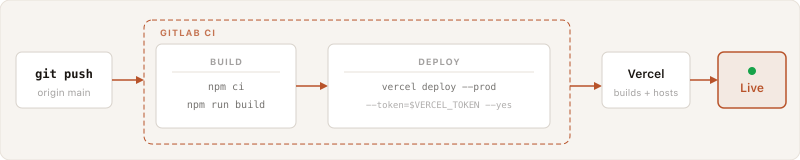
The flow I wanted: push code to GitLab → GitLab runs a build check → GitLab deploys to Vercel via CLI token. Vercel stays as the host. GitLab becomes the gatekeeper. One new file — .gitlab-ci.yml — and a couple of CI variables.
What broke, in order
The first deploy targeted the wrong project. My initial .gitlab-ci.yml used the three-command Vercel approach: vercel pull, vercel build, vercel deploy --prebuilt. The problem is that vercel pull needs .vercel/project.json to know which project to link to — and that file is gitignored. The CI runner had no idea which Vercel project it was deploying to.
The fix was simpler: skip the pull/build dance and just do vercel deploy --prod --token=$VERCEL_TOKEN --scope=$VERCEL_ORG_ID --yes. One command. Vercel handles the build remotely. The --scope flag locks it to my org and Vercel figures out the project by name.
react-markdown and remark-gfm weren’t in package.json. I’d installed them locally at some point and they worked fine on my machine. But npm ci — which CI uses instead of npm install — is strict about the lockfile. The packages were imported in code, missing from the manifest, and the build failed. Quick fix: npm install react-markdown remark-gfm, commit, push.
The app looked completely broken after the first good deploy. Users had been accessing it fine for months, on multiple devices. After the GitLab deploy, the home page showed encrypted gibberish and the navigation to themed views was gone.
Here’s what actually happened: I’d been deploying directly from my local machine with npx vercel --prod. No git required. The Vercel project had whatever code I last deployed locally. When I initialized the git repo for GitLab CI, I committed the current local files — but those weren’t identical to what Vercel was already serving. There was drift.

CI deployed the committed version, which had bugs that were never visible because users always navigated around them in warm browser sessions with cached state. A pre-existing bug — just never surfaced before.
CSS keyframes for the rocket and saturn ring animations were missing. Same story — defined locally at some point, never committed, never noticed because the live Vercel deployment still had them. CI deployed the git version. Rocket stopped flying. Rings stopped spinning.
How to set this up yourself
If you have a Next.js app on Vercel and want GitLab CI handling your deploys:
1. Create a GitLab repo and push your project
git init
git remote add origin https://gitlab.com/yourusername/yourproject.git
git add .
git commit -m "Initial commit"
git push -u origin main
2. Get your Vercel token and org ID
Vercel token: Account Settings → Tokens → Create. Org ID: your team or personal account slug, visible in Vercel project URLs.
3. Add CI variables in GitLab
Settings → CI/CD → Variables. Add VERCEL_TOKEN (mark as masked) and VERCEL_ORG_ID.
4. Create .gitlab-ci.yml
stages:
  - build
  - deploy

build:
  stage: build
  image: node:20
  cache:
    key: $CI_COMMIT_REF_SLUG
    paths:
      - node_modules/
      - .next/cache/
  variables:
    NEXT_PUBLIC_SUPABASE_URL: "https://placeholder.supabase.co"
    NEXT_PUBLIC_SUPABASE_ANON_KEY: "placeholder"
  script:
    - npm ci
    - npm run build
  only:
    - main

deploy:
  stage: deploy
  image: node:20
  script:
    - npm install --global vercel
    - vercel deploy --prod --token=$VERCEL_TOKEN --scope=$VERCEL_ORG_ID --yes
  only:
    - main
A few notes: the build stage uses placeholder Supabase values because those public vars are only needed for type-checking and static generation — Vercel injects the real ones during its remote build in the deploy stage. The cache block stores node_modules and .next/cache between runs so subsequent builds are faster.
The thing I keep relearning
Using an AI agent has helped take my learning so, so far. But you have to know what you are doing because AI does not, most times, do things the same way unless it’s explicit in md files, which I now always make sure I prompt for.